

A FREE standard shipping option is available to all US, APO and FPO addresses at checkout for all orders of $499 or more (excludes Smoke Grenades). ChutingStar ships worldwide from our Marietta, Georgia, location. Orders are packaged and shipped Monday through Friday. ChutingStar offers several shipping speeds from USPS and UPS at checkout. Full Shipping Info at this link.
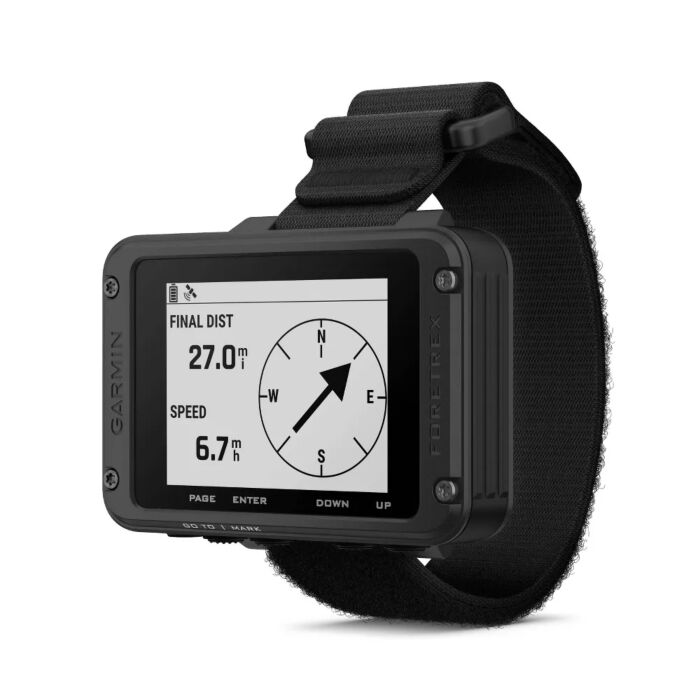
Garmin Foretrex 801 Wrist-Mount GPS
$249.99
SuperStars Rewards can be earned and spent on products you purchase online at checkout. You must be logged in to your account at checkout to earn and/or use your points. Full details on the the SuperStars Rewards Program can be found at this link.
We want you to be completely satisfied with your purchase. If you change your mind about the color or the fit is not quite right, whatever the reason, you can exchange it for another item or return it for a refund. ChutingStar will accept most items back for a full or partial refund, depending upon the original item, the condition and the timeliness of the return. Full returns and exchanges info at this link.
Related Products

Garmin Foretrex 801 Wrist-Mount GPS.
Wrist-mounted GPS Navigator with Strap.
Tandem instructors, wingsuit flyers and experienced skydivers allowed to jump over clouds use this to come through the clouds in their desired location. See the Skydiver Notes at the end of this description for more info and help on setup.
The most exciting feature for skydivers is the Jumpmaster function, designed for skydiving, with options including forward throw, windspeed and HARP to ensure an accurate location in the air. This is a great backup for your real altimeter when above clouds.
Recent Improvements:
- NEW Long Battery Life: Get up to 100 hours of battery life in default GPS mode or up to 1000 hours in expedition mode with 2 field-replaceable AAA batteries (not included).
- NEW Stealth Mode: While keeping the device operational, stealth mode stops storing and sharing your GPS position and disables wireless connectivity and communication.
- NEW Kill Switch: In case of security issues, hit the kill switch to erase the device memory.
- NEW Multi-Band GNSS: Get improved position accuracy with upgraded multi-band GNSS.
MAKE THE MISSION POSSIBLE
This wrist-mounted GPS navigator is built for the mission and beyond. It features an easy-to-read monochromatic display, upgraded multi-band GNSS and advanced navigation sensors to help you explore with confidence.
- EASY-TO-READ MONOCHROMATIC SCREEN
- MULTI-BAND GNSS
- NIGHT VISION GOGGLE COMPATIBLE
- STEALTH MODE
- PLAN ADVENTURES WITH THE GARMIN EXPLORE™ APP
- KILL SWITCH
LONG BATTERY LIFE
Get up to 100 hours of battery life in navigation mode or up to 1000 hours in expedition mode; uses 2 field-replaceable AAA batteries (not included).
DURABLE
Tested to military standards (MIL-STD-810) to withstand sand and dust, vibration, shock, temperature, altitude, humidity and more. The rugged design features an IPX7 water-resistant rating.
TACTICAL FEATURES
Use stealth mode to stop storing and sharing GPS data and disable wireless connectivity. In case of security issues, hit the kill switch to erase the device memory. Use jumpmaster mode to calculate high-altitude release points in accordance with military guidelines.
EASY-TO-READ SCREEN
The improved monochromatic screen is easy to read in a variety of lighting conditions, even with night vision goggles.
NAVIGATION SENSORS
Navigate the terrain with advanced sensors, including a 3-axis accelerometer, 3-axis compass and barometric altimeter. Get improved position accuracy with upgraded multi-band GNSS.
CONNECT YOUR DEVICES
Get smart notifications when linked with your compatible smartphone. Pair with your compatible inReach® satellite communicator, and view messages directly on the screen1.
General
- QUICKFIT™ WATCH BAND COMPATIBLE (26 mm)
- DIMENSION 2.9" x 1.9" x 0.9"
- DISPLAY SIZE 2.2" diagonal
- DISPLAY RESOLUTION 320 x 240 pixels
- DISPLAY TYPE monochrome MIP
- WEIGHT 3.8 oz with batteries
- WATERPROOF IPX7
- BATTERY TYPE 2 AAA batteries (not included)
- BATTERY LIFE Up to 100 hours in default GPS Mode & UP to 1000 hours in Expedition Mode
- MIL-STD-810 yes (thermal, shock, water); bare unit only
- INTERFACE USB-C
Maps & Memory
- COURSES 500
- TRACKS 100
- NAVIGATION TRACK LOG 10,000
- NAVIGATION ROUTES 50
Sensors
- GPS
- GLONASS
- GALILEO
- MULTI-FREQUENCY POSITIONING
- BAROMETRIC ALTIMETER
- COMPASS Yes (tilt-compensated 3-axis)
- GPS COMPASS (WHILE MOVING)
Daily Smart Features
- PAIRS WITH GARMIN CONNECT™ MOBILE
- SMART NOTIFICATIONS ON HANDHELD
Tactical Features
- STEALTH MODE
- NIGHT VISION MODE
- DUAL GRID COORDINATES
- KILL SWITCH
Outdoor Recreation
- POINT-TO-POINT NAVIGATION
- TRACBACK®
- AREA CALCULATION
- HUNT/FISH CALENDAR
- SUN AND MOON INFORMATION
Outdoor Applications
- COMPATIBLE WITH GARMIN EXPLORE™ APP
- GARMIN EXPLORE WEBSITE COMPATIBLE
Connections
- CONNECTIONS WIRELESS CONNECTIVITY (BLUETOOTH®, ANT+®)
What's Included:
- Foretrex 801
- Hook and loop wrist strap
- USB-C cable
- Documentation
Skydiver Notes:
On the Foretrex 801 (same as with most Garmin handhelds), the “arrow” you see isn’t always a simple “point to dropzone” arrow. It changes depending on which navigation mode you’re in and how the unit interprets heading vs. bearing:
How Garmin Arrows Work
-
Bearing Pointer (default)
-
The arrow points directly to the waypoint (DZ) from your current location.
-
If you’re in the plane and moving, the pointer can seem “off” compared to the plane’s heading, because the DZ might be behind you, off to the side, or not exactly in line with the flight path.
-
-
Course Pointer (sometimes called CDI or track mode)
-
The arrow shows where your waypoint is relative to the track line you should be on.
-
This is more like a navigation instrument: it tells you if you’re left or right of course, not just “point at the DZ.”
-
-
Orientation issue (compass vs. GPS)
-
The 801 uses GPS-heading when you’re moving and electronic compass when you’re not.
-
In a fast-moving aircraft, GPS heading dominates, and the arrow is relative to that — so it doesn’t always line up with the nose of the plane.
-
Why It Looks “Wrong” in the Plane
-
If the DZ is behind you, the arrow will point behind (relative to ground track), not forward with the plane.
-
If the aircraft is crabbing (crosswind), your ground track isn’t the same as the nose direction — so the arrow seems offset.
-
If you’re not actively “navigating to waypoint” but just have the waypoint visible, the arrow may not be set to “bearing pointer mode.”
What You Probably Want for Skydiving
For wingsuit navigation, you usually want the Bearing Pointer mode:
-
It keeps the arrow always pointing straight at the DZ, regardless of plane heading.
-
That way when you’re under canopy or wingsuit, you know which way to fly to get home.
On the Foretrex 801:
-
Go into Navigation settings.
-
Look for Pointer Type → set it to Bearing (not Course/Track).
-
Then, while flying, “Go To” your DZ waypoint. The arrow should always point directly to it, no matter where the plane is heading.
To test to to see if it works. Next time you’re on the ground, mark your car as a waypoint, walk in random directions, and watch the arrow. If it always points to your car no matter where you face, you’ve got the right setting.
| Price | $249.99 |
|---|---|
| Brand | Garmin |
| Color | Black- |
| Alarm Type | Custom alarm - see product description |
| Analog/Digital | Digital |
| Battery Type | AAA |
| Downloadable Info | Yes |
| Feet or Meters | Settings for Feet and Meters |
| Function | Altimeter and watch |
| Wearability | Wristmount |
| Price View | Price Range |
Write Your Own Review
